
Free · host plugin
Govern every AI ability on your WordPress
Abilities Manager is the central registry for WordPress abilities — typed, permissioned actions AI agents can call. Review every ability, and set allow, ask, or deny from one screen, with a full audit trail.
Runs on your server · Works with MCP Manager · No lock-in
content/create-postmedia/upload-mediadatabase/run-db-select-queryblocks/create-block-templateplugins/install-plugincontent/create-postmedia/upload-mediadatabase/run-db-select-queryblocks/create-block-templateplugins/install-plugincontent/create-postmedia/upload-mediadatabase/run-db-select-queryblocks/create-block-templateplugins/install-plugincontent/create-postmedia/upload-mediadatabase/run-db-select-queryblocks/create-block-templateplugins/install-plugincontent/create-postmedia/upload-mediadatabase/run-db-select-queryblocks/create-block-templateplugins/install-pluginblocks/update-post-blockmedia/list-mediadatabase/search-replaceblocks/update-theme-jsonsite-health/get-site-health-statusblocks/update-post-blockmedia/list-mediadatabase/search-replaceblocks/update-theme-jsonsite-health/get-site-health-statusblocks/update-post-blockmedia/list-mediadatabase/search-replaceblocks/update-theme-jsonsite-health/get-site-health-statusblocks/update-post-blockmedia/list-mediadatabase/search-replaceblocks/update-theme-jsonsite-health/get-site-health-statusblocks/update-post-blockmedia/list-mediadatabase/search-replaceblocks/update-theme-jsonsite-health/get-site-health-statusblocks/move-blockmedia/rename-media-filedatabase/get-db-statsblocks/list-block-patternscron/list-cron-jobsblocks/move-blockmedia/rename-media-filedatabase/get-db-statsblocks/list-block-patternscron/list-cron-jobsblocks/move-blockmedia/rename-media-filedatabase/get-db-statsblocks/list-block-patternscron/list-cron-jobsblocks/move-blockmedia/rename-media-filedatabase/get-db-statsblocks/list-block-patternscron/list-cron-jobsblocks/move-blockmedia/rename-media-filedatabase/get-db-statsblocks/list-block-patternscron/list-cron-jobsblocks/get-post-blocksmedia/list-image-sizesfile-manager/create-zip-backupthemes/activate-themerank-math/audit-site-seoblocks/get-post-blocksmedia/list-image-sizesfile-manager/create-zip-backupthemes/activate-themerank-math/audit-site-seoblocks/get-post-blocksmedia/list-image-sizesfile-manager/create-zip-backupthemes/activate-themerank-math/audit-site-seoblocks/get-post-blocksmedia/list-image-sizesfile-manager/create-zip-backupthemes/activate-themerank-math/audit-site-seoblocks/get-post-blocksmedia/list-image-sizesfile-manager/create-zip-backupthemes/activate-themerank-math/audit-site-seoblocks/insert-patterntaxonomies/set-term-imagefile-manager/read-debug-logthemes/read-theme-codefluent-crm/list-contactsblocks/insert-patterntaxonomies/set-term-imagefile-manager/read-debug-logthemes/read-theme-codefluent-crm/list-contactsblocks/insert-patterntaxonomies/set-term-imagefile-manager/read-debug-logthemes/read-theme-codefluent-crm/list-contactsblocks/insert-patterntaxonomies/set-term-imagefile-manager/read-debug-logthemes/read-theme-codefluent-crm/list-contactsblocks/insert-patterntaxonomies/set-term-imagefile-manager/read-debug-logthemes/read-theme-codefluent-crm/list-contactscontent/update-postusers/list-usersoptions/patch-option-valuecomments/bulk-update-commentsacf/register-field-groupcontent/update-postusers/list-usersoptions/patch-option-valuecomments/bulk-update-commentsacf/register-field-groupcontent/update-postusers/list-usersoptions/patch-option-valuecomments/bulk-update-commentsacf/register-field-groupcontent/update-postusers/list-usersoptions/patch-option-valuecomments/bulk-update-commentsacf/register-field-groupcontent/update-postusers/list-usersoptions/patch-option-valuecomments/bulk-update-commentsacf/register-field-groupmenus/create-menu-itemrecovery/list-paused-pluginsfonts/create-font-familysettings/set-permalink-structurecontent-search/audit-internal-linksmenus/create-menu-itemrecovery/list-paused-pluginsfonts/create-font-familysettings/set-permalink-structurecontent-search/audit-internal-linksmenus/create-menu-itemrecovery/list-paused-pluginsfonts/create-font-familysettings/set-permalink-structurecontent-search/audit-internal-linksmenus/create-menu-itemrecovery/list-paused-pluginsfonts/create-font-familysettings/set-permalink-structurecontent-search/audit-internal-linksmenus/create-menu-itemrecovery/list-paused-pluginsfonts/create-font-familysettings/set-permalink-structurecontent-search/audit-internal-linkscontent/create-pagetaxonomies/create-termcache/flush-transientsplugins/verify-plugin-checksumsblocks/list-blockscontent/create-pagetaxonomies/create-termcache/flush-transientsplugins/verify-plugin-checksumsblocks/list-blockscontent/create-pagetaxonomies/create-termcache/flush-transientsplugins/verify-plugin-checksumsblocks/list-blockscontent/create-pagetaxonomies/create-termcache/flush-transientsplugins/verify-plugin-checksumsblocks/list-blockscontent/create-pagetaxonomies/create-termcache/flush-transientsplugins/verify-plugin-checksumsblocks/list-blocksOne screen, full control
What you control per ability
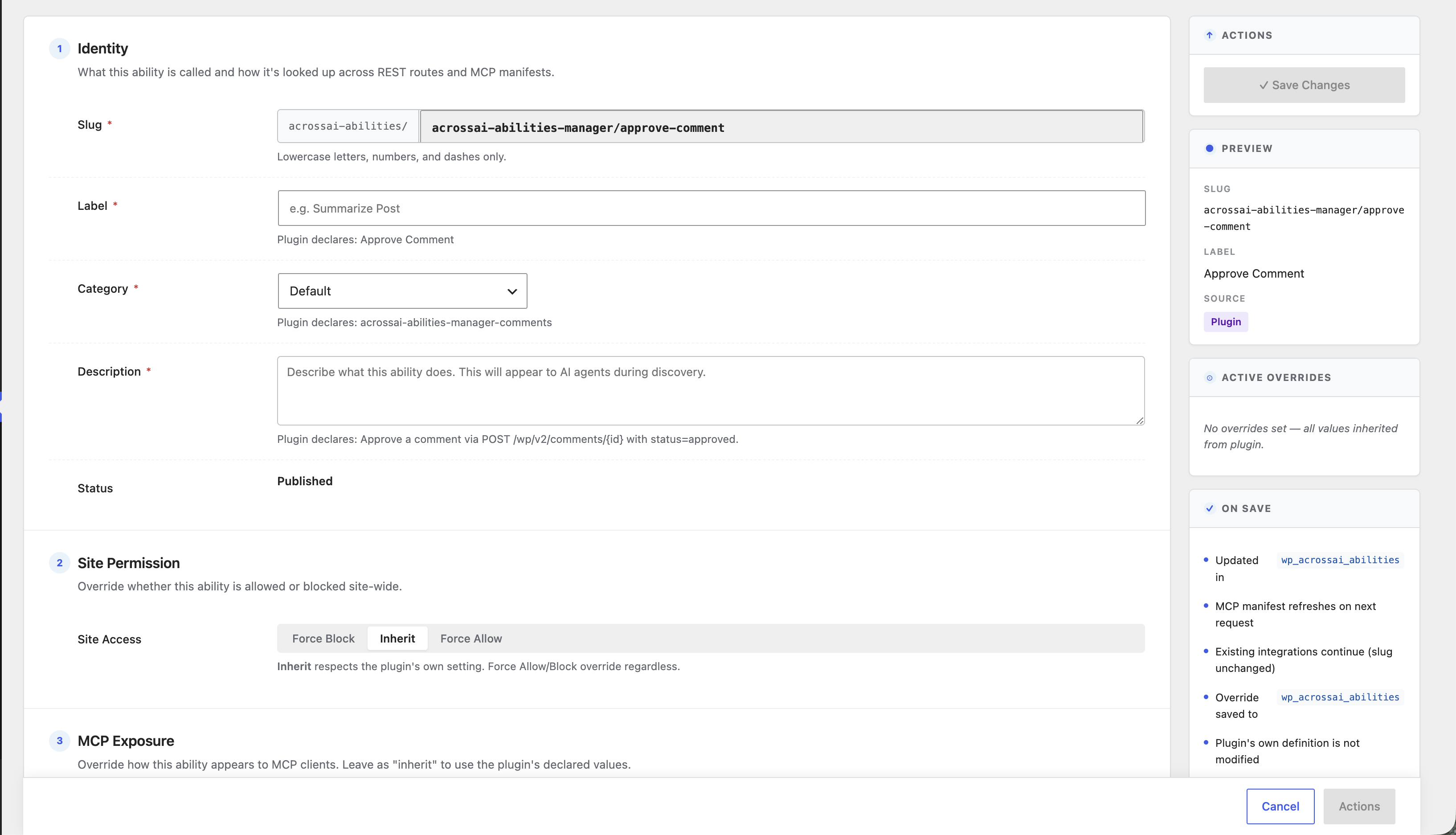
Identity
Slug, label, category and description — how the ability is looked up across REST routes and MCP manifests.
Site permission
Force Block, Inherit, or Force Allow site-wide — Inherit respects the plugin’s own setting.
MCP exposure
Show or hide from MCP clients and set the MCP type — tool, resource, or prompt.
Annotation overrides
Force readonly, destructive, idempotent and show-in-REST hints — or defer to the plugin.
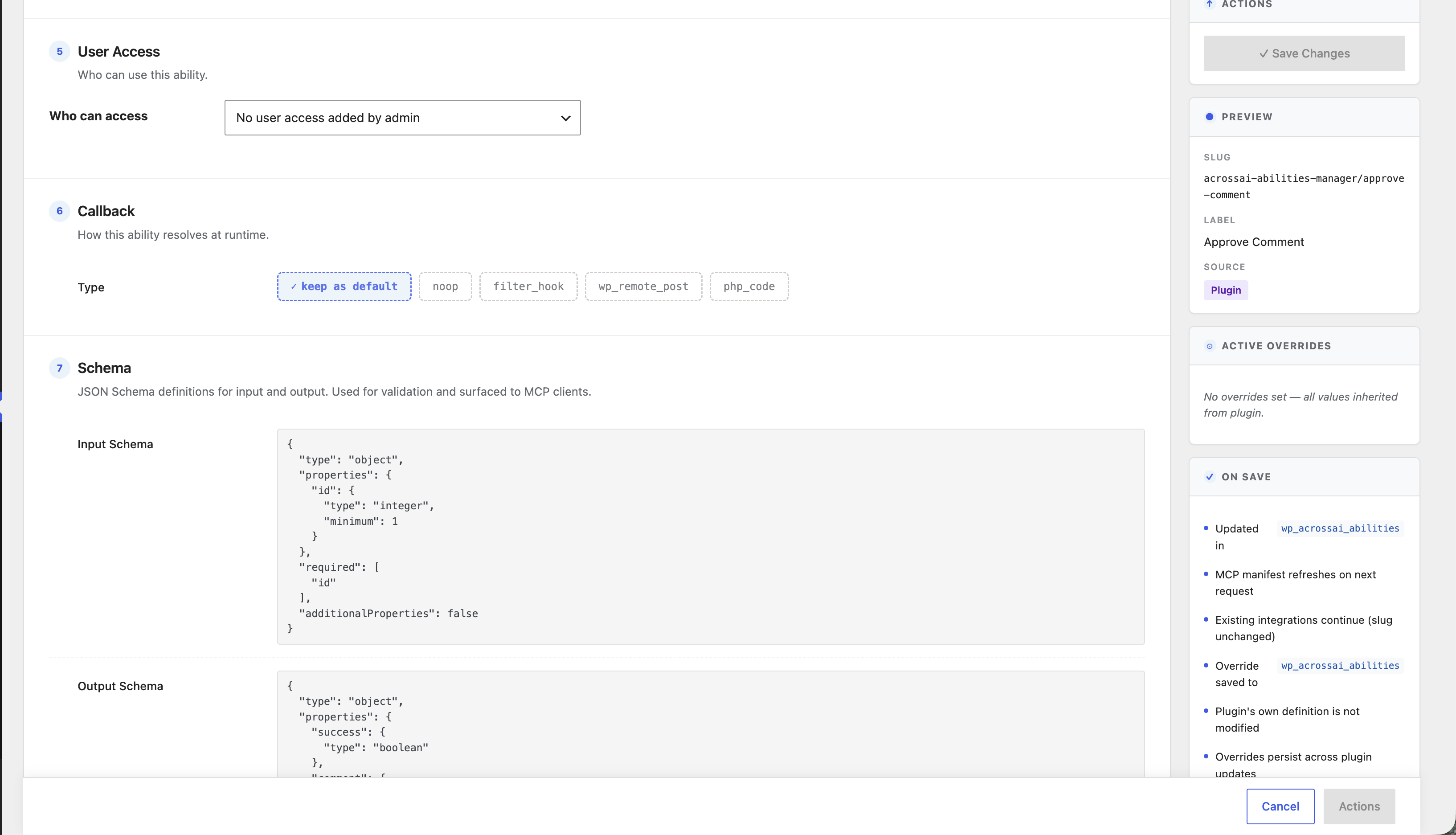
User access
Decide exactly which roles and users may invoke the ability.
Callback & schema
Choose how it resolves at runtime and define JSON input/output schema for validation.
Set up in three steps
1
Install & activate
Add Abilities Manager from WordPress.org. Every registered ability appears in one searchable table.
2
Review each ability
Open any ability to see its slug, schema and annotations — exactly what an AI agent sees on discovery.
3
Override & save
Set permission, MCP exposure and access. Overrides persist across plugin updates — the plugin’s own definition is untouched.
Every ability, one table
Filter by source and status, search, and open any ability to override it.
Safe by default
Guardrails, not guesswork
- Allow / ask / deny. Every ability is individually gated — nothing runs unapproved.
- Force Block or Force Allow. Override site-wide, or Inherit the plugin’s own setting.
- Capability-aware. Restrict who can invoke each ability by role and user.
- Append-only audit log. Every sensitive call is recorded — who, what, and when.
- Overrides persist. Your settings survive plugin updates; the plugin definition is never modified.
- Your data stays home. Everything runs inside your own WordPress install.
Frequently asked questions
What is a WordPress “ability”?
An ability is a typed, permissioned action a plugin exposes for AI agents — like “approve a comment” or “create a post.” Abilities Manager is the registry where you review and govern all of them.
Does it change what my plugins declare?
No. Your overrides are stored separately and persist across updates — the plugin’s own definition is never modified.
How does it relate to MCP Manager?
Abilities Manager governs the abilities; MCP Manager exposes the approved ones to MCP clients like Claude, ChatGPT and Cursor. Use them together.
Is it really free?
Yes — Abilities Manager is a free host plugin on WordPress.org and works standalone. Optional paid add-ons extend it.