
MCP server + Abilities API for WordPress
Your AI connects straight to your server
Hosted MCP services route your site through their cloud and cap your daily usage. AcrossAI doesn’t. Connect Claude, ChatGPT, Grok, Gemini or Cursor directly to your self-hosted site — no relay, no daily limits, no member data leaving your host.
Free to start · Bring your own AI · Any host
Works with any MCP client
Claude
ChatGPT
Cursor
Grok
Gemini
Codex
GitHub Copilot
VS Code
Claude Code
+ any MCP client
2
Free host plugins
100%
Runs on your server
MCP
Open standard protocol
0
Vendor lock-in
What is AcrossAI?
AcrossAI is a family of WordPress plugins that add an open Abilities API and a built-in MCP server to your site. Together they let any AI agent — Claude, ChatGPT, Cursor, Gemini, Grok, and more — securely discover and run actions on WordPress, with per-ability permissions you control and a full audit trail.
Set up in about a minute
Connect your AI in three steps
1
Install the free plugins
Add Abilities Manager and MCP Manager from WordPress.org. They share one admin menu and settings page.
2
Approve abilities
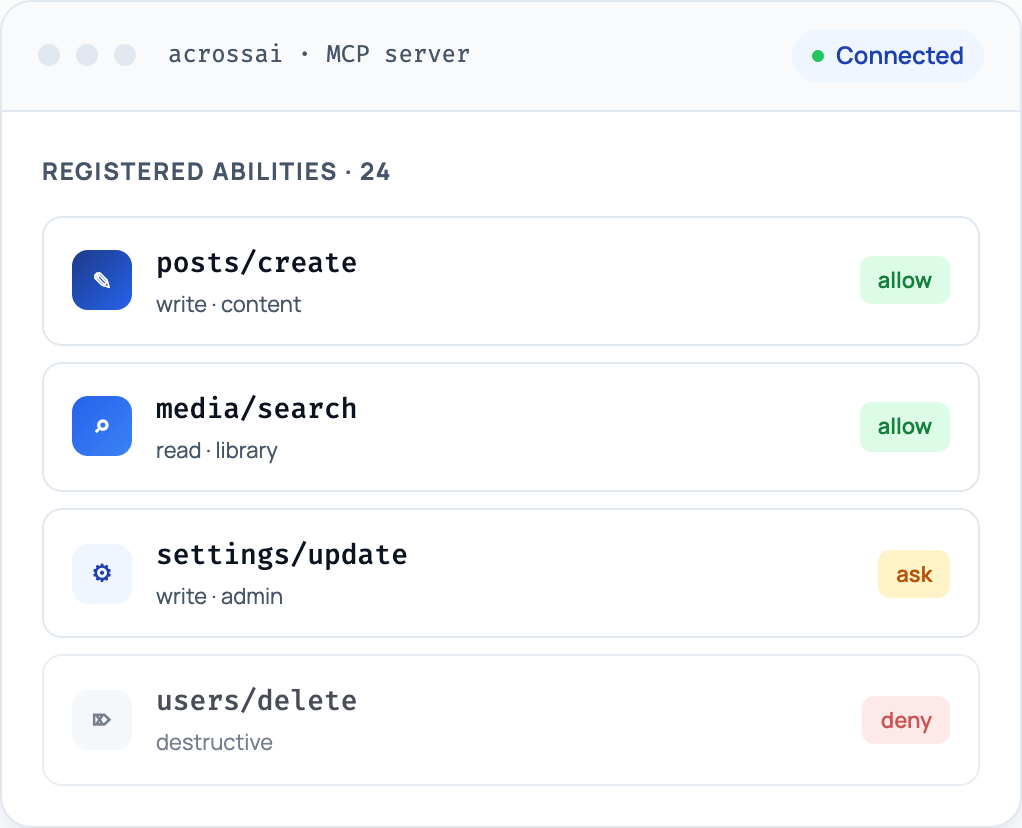
Choose exactly which actions AI can take — allow, ask, or deny each one. Every call is written to the audit log.
3
Connect your AI
Point Claude, ChatGPT, Cursor, or any MCP client at your endpoint. Your agent can now work across your site — in plain English.
Two free foundations
Start with the host plugins
Abilities Manager
A central registry for WordPress “abilities” — typed, permissioned actions that plugins expose for AI agents to call. Review, allow, or gate every ability from one screen.
- Open Abilities API for any plugin
- Per-ability allow / ask / deny controls
- Full audit log of every call
MCP Manager
A built-in Model Context Protocol server for WordPress. Connect Claude, ChatGPT, Cursor, or any MCP client and let it use the abilities you’ve approved — no middleman service.
- Standards-based MCP endpoint
- Bring your own AI client
- Token-scoped, revocable access
What your AI can do
Open Abilities API
Any plugin can register typed, permissioned actions. Your AI discovers them automatically.
Built-in MCP server
A standards-based endpoint any MCP client connects to — no middleman cloud service.
Manage content
Create and edit posts, pages, media, and taxonomies — drafts by default, in plain English.
Granular permissions
Allow, ask, or deny each ability. Powerful actions require an administrator.
Bring your own AI
Use the Claude, ChatGPT, Cursor, or Copilot you already pay for — including their free plans.
Extensible add-ons
Grow with AcrossAI Pro — membership-aware access control and ability packs for the plugins your business runs on.
Safe by default
Real guardrails, not promises
- Per-ability permissions. Every action is allow, ask, or deny — nothing runs that you haven’t approved.
- Capability-aware. Powerful operations respect WordPress roles — admin actions require an administrator.
- Draft-first writes. New content lands as a draft. AI cannot publish without your review.
- Append-only audit log. Every sensitive call is recorded — who, what, and when.
- Revocable, token-scoped access. Connect via WordPress Application Passwords; revoke in one click.
- Your data stays home. Everything runs on your WordPress install — no content routed through a third-party cloud.
Built into MCP Manager
One plugin. Five AI connectors.
MCP Manager turns your endpoint into a native remote connector for all five AI clients — paste one URL, approve the consent screen, and your WordPress is live with that AI. One plugin, five AIs, one dashboard.
Claude Connector
Add your MCP endpoint to Claude as a one-click remote connector — web, desktop, and Code — and manage every connection from your dashboard.
Explore the Claude connector →ChatGPT Connector
Connect ChatGPT to WordPress through a governed MCP URL — no JSON, no OAuth fields — with full visibility and one-click revoke.
Explore the ChatGPT connector →Grok Connector
Give Grok a native home in WordPress via one MCP endpoint — connect across surfaces and sever access site-wide whenever you need.
Explore the Grok connector →Gemini Connector
Point Gemini at your MCP endpoint and work with WordPress directly — governed access, full audit visibility, and revoke in one click.
Explore the Gemini connector →Cursor Connector
Connect Cursor to your MCP endpoint and work on WordPress from the editor: governed access, full audit visibility, and revoke in one click.
Explore the Cursor connector →Frequently asked questions
What is an MCP server?
MCP (Model Context Protocol) is an open standard that lets AI assistants connect to external tools and data. AcrossAI MCP Manager is a WordPress MCP server — it gives AI a structured, permission-aware interface to your site for reading content, creating posts, managing media, and more.
Do I need another AI subscription?
No — that’s the point. You bring the Claude, ChatGPT, Cursor, or Copilot you already use, and it works on their free plans too. AcrossAI never charges for AI inference.
Is it safe to give AI access to my site?
Yes. Every ability is individually gated with allow, ask, or deny; powerful operations require an administrator; new content defaults to draft; and every sensitive call lands in an append-only audit log. AcrossAI runs on your own server and access is revocable in one click.
Is AcrossAI free? What’s paid?
Both host plugins — Abilities Manager and MCP Manager — are free on WordPress.org and work standalone. AcrossAI Pro is the optional paid add-on, extending them with membership-aware access control and deeper plugin ability packs.
Which AI clients work with AcrossAI?
Any MCP-compatible client, including Claude, ChatGPT, Cursor, Grok, Gemini, Codex, GitHub Copilot, VS Code, and Claude Code. You bring your own AI — there is no vendor lock-in.
Does it work with my hosting provider?
Yes. If you can log into your wp-admin dashboard, you’re good — shared hosting, VPS, and managed WordPress all work. AcrossAI runs inside your own WordPress install.
Give your AI access to WordPress
Install the free host plugins and connect your first AI agent in about a minute.
Free to start · Bring your own AI