
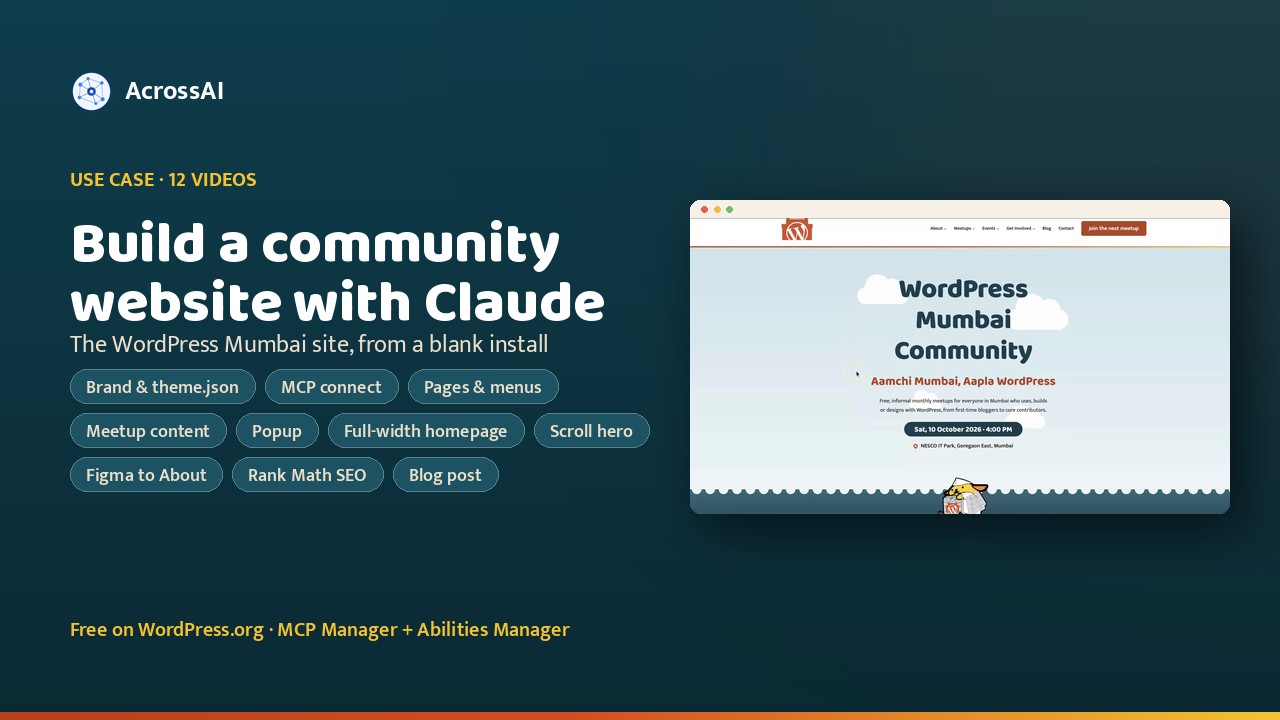
Can Claude build a complete community website from nothing? Yes. For a WordPress Mumbai meetup talk, I built a demo site for the WordPress Mumbai Community in plain English: brand research, a block theme, pages, header and footer, real content, a popup, a Figma-designed About page, SEO and a published blog post.
This is an example build for the talk, not the community’s official website. The demo started as a fresh, default WordPress install with no plugins. Claude was connected to it over MCP (the Model Context Protocol) using the free MCP Manager plugin, so every request I typed went straight to the site. I recorded each step, so there are twelve short videos below, one per part of the build.
12
Build steps, one video each
20+
Pages, from About to Contact
456
Abilities active by the end
2
Design tools: Claude Design and Figma
Four free plugins behind the build
Every plugin used is free on WordPress.org. Two connect Claude to WordPress; two add what a community site needs.
01
Connects Claude
AcrossAI MCP Manager
The WordPress MCP server. It connects Claude (or any MCP client) to the site as a real WordPress user.
02
Gives Claude abilities
AcrossAI Abilities Manager
Registers the operations Claude can perform, from theme files and menus to media, plugins and options. See every ability.
03
Forms
Contact Form 7
The contact form for talk proposals, volunteers and venue offers. See the Contact Form 7 integration.
04
SEO
Rank Math SEO
Titles, descriptions, schema and the sitemap, all set through Rank Math’s own abilities. See the Rank Math integration.
Twelve steps, twelve videos
Here’s each request I typed (lightly tidied), what Claude did with it, and the recording.
Step 01
Brand research and the global stylesheet
The prompt
I’m building a website for the WordPress Mumbai Community. Find the logo, colors and social media links we can use, then create a global stylesheet for a block theme. Add gradients, and use the same logo we use for the meetup.
Claude found the community’s Gateway of India logo, designed by Alexander Gounder for WordCamp Mumbai 2014, plus its mascots and social links. It then wrote a theme.json with a Mumbai palette (Gateway Orange, Arabian Sea, Kaali-Peeli Yellow), five gradients such as Gateway Sunset and Marine Drive Night, and two fonts from Ek Type, a Mumbai type foundry, that support Devanagari for Marathi and Hindi.
Step 02
Connecting the site to Claude
The prompt
Connect this WordPress site to Claude.
I installed MCP Manager and ran Quick Connect: only administrators can reach the server, 362 abilities were installed and enabled, and the server was turned on. I added the site as a custom connector in Claude, approved it on the site as admin, and asked “Can you access my site?” to confirm.
Step 03
Applying the theme and logo
The prompt
Add the theme.json, or global style sheet, to my website with the logo as well.
Claude wrote the block theme’s files to the site, activated it, copied the logo and square icon into the media library, and set them as the Site Logo and Site Icon. The Site Editor now showed the new fonts, the palette and the gradients.
Step 04
Pages, posts, header and footer
The prompt
Create the pages and posts you need, with titles only, and build a header and footer. You can refer to the WordCamp Mumbai website too.
Claude created the page tree (About, Meetups, Events, Get Involved and their sub-pages), three title-only posts, categories and three navigation menus. When it hit its limit, it listed exactly what was still missing. I replied “yes please”, and it linked the header to the menu, built the footer columns, added page, post and 404 templates, and removed the sample content.
Step 05
Real content from Meetup.com
The prompt
Add content to the pages. Pick the content and images from our Meetup.com page. Install plugins if you need them, like Contact Form 7 for the contact page.
Claude used the Meetup.com group page for the copy, the group photo and the next meetup’s details, added the mascots, and installed Contact Form 7 for the Contact page. Instead of importing 185+ past events, it linked to them on Meetup.com. It also flagged that the form was still sending to the sandbox’s placeholder email.
Step 06
A newsletter popup, designed first
The prompt
Using the theme.json global styles, design a popup that asks visitors to subscribe to the newsletter. Then add it to the website with a plugin, and show it to first-time visitors.
I designed the popup in Claude Design, starting from the same global styles so it matched the site. Claude then added it to the live site with a newsletter popup plugin, shown when someone visits for the first time.
Step 07
A WordCamp-inspired homepage
The prompt
Take inspiration from this first section of the WordCamp Mumbai site and create something like it on our homepage. Make the homepage a full-width template.
From a screenshot, Claude built a new hero section and a full-width homepage template. When the rest of the site still looked boxed in, I added more context: update the theme.json to make it full width. More precise context meant fewer wasted tokens and a quicker fix.
Step 08
Scroll animations for the hero
The prompt
Add a scrolling effect to the first section, like the WordCamp Mumbai site. Create or source images if you need them.
Claude added scroll-driven animation and a blur effect to the homepage hero, and showed today’s meetup timing in it. The lesson I keep repeating: the better the prompt and the context, the better the result.
Step 09
From Figma to the About page
The prompt
Fetch the About us design from Figma and add it to the site with the same look and proper margins. Create a custom header and footer for the About page only.
First Claude turned the theme.json into a design-token file for Figma, so Figma designed with the site’s colors and fonts instead of guessing. Through the Figma connector it then read the frame, exported the Gateway illustration as SVG, and built an About-only template with its own header and footer. When I sent a screenshot of the content sitting in a narrow column, it found the cause in the template and fixed the homepage’s same hidden bug too.
Step 10
SEO with Rank Math
The prompt
Install Rank Math and get me the SEO.
Claude installed Rank Math, whose abilities appeared through MCP Manager straight away. It ran an audit (106 issues across 24 pages and posts) and pointed out the biggest one first: the site was set to discourage search engines. After a settings backup and a “yes”, it wrote titles, descriptions and focus keywords for every page, switched the schema to an Organization with logo and social profiles, and set a default share image. Connecting Rank Math and Google accounts stayed a manual step.
Step 11
Writing and publishing a blog post
The prompt
Write a blog post on the upcoming WordCamp Mumbai 2027. Pick the details from the official site and add as many as possible.
Claude read the official WordCamp Mumbai 2027 site and published a full post: 13 February 2027 at ATLAS SkillTech University in Kurla, the call for speakers and its topics, talk formats, sponsorship deadline, directions and key dates. Rank Math’s title, description and focus keyword were filled in without being asked. On a “yes please” it set a featured image, which showed up when the link was shared on Facebook.
Step 12
Inside MCP Manager
The prompt
Show me what’s been set up.
A tour of the dashboard: 456 active abilities grouped by area, 88 of them from Rank Math, and two servers. Only administrators can connect by default, and each ability has its own role check, also admin-only. You can bulk-grant abilities to another role, such as Editor, when you need to.
The abilities doing the work
Theme
file-manager/create-file
Write the block theme’s theme.json, templates and template parts to the site.
Media
media/upload-media
Copy the logo, icon, mascots and group photo into the media library from their source URLs.
Content · Navigation
content/create-page + blocks/create-navigation
Build the page tree, then the header and footer menus that point to it.
Plugins
plugins/install-plugin
Install and activate Contact Form 7 and Rank Math from WordPress.org.
SEO
rank-math/audit-content-seo + bulk-update-meta
Find every missing title and description, then fix all 24 in one call.
Settings
settings/update-site-logo + update-site-icon
Set the Gateway of India logo and the square icon site-wide.
The best part isn’t the speed
Building a whole community site in a chat is a nice headline. The real value is that Claude made the choices a careful developer would, so the site is easy to keep running.
01 · Plugins
Reached for plugins first
Contact Form 7 for forms, Rank Math for SEO, a popup plugin for the newsletter. Claude used existing plugins wherever one fit.
02 · Honesty
Said what it couldn’t do
When WordPress refused font file uploads, it said so, loaded the fonts another way and told me the trade-off. It also reverted the upload setting it had tried changing.
03 · Feedback
Fixed what I didn’t like
A screenshot of the About page in a narrow column was enough. Claude found the template cause and fixed the homepage’s same hidden bug while it was there.
04 · Risks
Flagged what could bite later
It warned that contact form emails were going to a placeholder inbox, that the site was hidden from search engines, and which lines of copy needed the organizers to check.
05 · Safety
Backed up before changing
It took a Rank Math settings backup before touching any SEO setting, so every change could be rolled back.
The moment the About page came back boxed in
What I saw
The new header and footer ran edge to edge, but every section in between sat in a narrow column in the middle of the screen.
What Claude found
The template wrapped the page content in the theme’s 720px reading column, so full-width sections could only stretch as wide as that column. It made the content area full width, then checked the homepage template and found the same hidden bug squeezing its hero, and fixed that too.
A screenshot and one sentence were enough. Claude fixed the cause, not just the page I was looking at.
Plugins with abilities are easier for AI
What this build showed
Rank Math ships 88 abilities through Abilities Manager, so Claude could audit every page and fix all 24 titles and descriptions in a single call, with a backup first. Without abilities, the same job means editing settings one screen at a time. If you build plugins, registering abilities is how you make them easy for AI to use well.
Try it on your own site
Install the two free plugins, connect Claude, and make your first request in minutes.
Frequently asked questions
Can Claude build a full WordPress website?
Yes. Once Claude is connected to WordPress over MCP, it can write a block theme, create pages and menus, install plugins, add content and handle SEO. This demo community site was built that way, one request at a time.
Can Claude turn a Figma design into a WordPress page?
Yes. With the Figma connector, Claude reads the frame, exports its artwork and rebuilds it with core blocks. Giving Figma the site’s theme.json first means the design already uses the right colors and fonts.
Can Claude do WordPress SEO with Rank Math?
Yes. Rank Math’s abilities let Claude audit every page, write titles, descriptions and focus keywords in bulk, fix the schema and set a default share image. Connecting your Rank Math and Google accounts stays a manual step.
Is it safe to let Claude manage a live WordPress site?
With MCP Manager, only administrators can connect by default, and each ability has its own role check. Claude uses named abilities rather than running arbitrary code, and you can revoke access at any time.
Which AI assistants work besides Claude?
MCP is an open standard, so the same setup works with ChatGPT, Cursor, VS Code with GitHub Copilot, Gemini CLI and other MCP clients.
How much does it cost?
The four plugins used in this build are free on WordPress.org. You only need an account with the AI assistant you chat with.
Build your own community site with Claude
Install the two free plugins, connect Claude, and start with your brand and a theme.json. Every plugin in this build is free on WordPress.org.
Watch the build: Brand research and the global stylesheet · Connecting the site to Claude · Applying the theme and logo · Pages, posts, header and footer · Real content from Meetup.com · A newsletter popup, designed first · A WordCamp-inspired homepage · Scroll animations for the hero · From Figma to the About page · SEO with Rank Math · Writing and publishing a blog post · Inside MCP Manager · Learn more: the WordCamp Rajasthan build · every plugin integration