
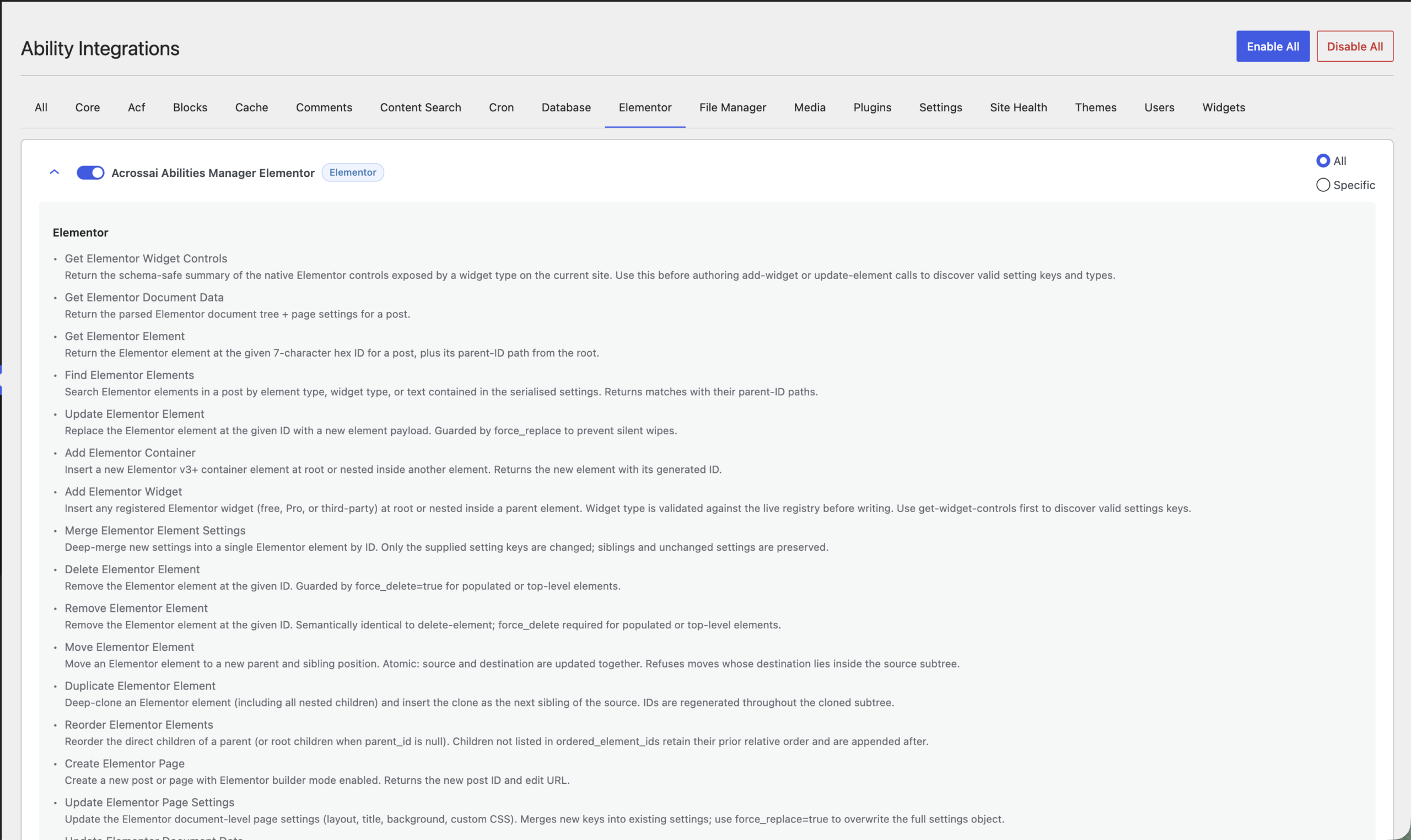
Until now, AcrossAI could read and write your posts, pages, media, users, and settings: everything WordPress core exposes. That covered blogging, docs, and SEO work, but it stopped at the edge of the page builder. If your site was built in Elementor, your AI assistant could see the post, but not the layout inside it.
That changes with Abilities Manager 0.0.26 (full changelog). AcrossAI now ships 89 new abilities, 87 of them for Elementor. Your AI client, whether that is Claude, ChatGPT, Gemini, Grok, or a local model running on your own machine, can now read, build, restructure, and audit Elementor documents directly, in plain English, on your own self-hosted site.
This is what an AI page builder should have looked like from the start: no proprietary editor, no third-party relay, no vendor lock-in. Just your existing Elementor install, exposed to whichever AI you already pay for.
Table of Contents
What “AI for Elementor” actually means here
Most tools marketed as Elementor AI generate content: a headline, a paragraph, an image, dropped into a widget you already placed by hand. The structural work stays manual.
AcrossAI works at the document level. Elementor stores every page as a nested JSON tree in _elementor_data. AcrossAI exposes that tree as a set of typed, permission-checked abilities over the Model Context Protocol, served by AcrossAI MCP Manager. Every ability below is callable under the acrossai/ namespace. Your AI assistant does not paste text into a box. It reads the actual element tree, understands the containers, columns, and widgets, and modifies them with the same guardrails a careful developer would use.
Practically, that means you can say:
Look at the pricing section on /pricing/, the three columns are visually unbalanced. Fix the spacing rhythm and make the middle card the dominant one.
and your AI reads the structure, identifies the elements by ID, and applies the change. No screenshots. No copy-paste. No plugin-specific chat sidebar.
Everything shipped in 0.0.26
Feature 067 is complete: all 88 planned Elementor abilities are live, plus two native site-maintenance abilities. Here is the surface, grouped by what you would actually use it for.
Reading and finding elements
acrossai/elementor-get-element: read a single element by its 7-character hex IDacrossai/elementor-find-elements: search a document byelement_type,widget_type, or contained textacrossai/elementor-evaluate-render-context: inspect the frontend template, canvas type, and edit-mode flagacrossai/elementor-get-theme-context: active theme, Elementor version, active kit, viewport settings
Building pages
acrossai/elementor-create-page: create a post or page pre-configured for Elementor and return the edit URLacrossai/elementor-add-container: insert an Elementor v3+ containeracrossai/elementor-add-widget: insert any registered widget, validated againstWidget_Controlsacrossai/elementor-add-heading,acrossai/elementor-add-text-editor,acrossai/elementor-add-image,acrossai/elementor-add-button: shortcuts for the widgets you place mostacrossai/elementor-add-post-tabs: a higher-order shortcut that builds a Nested Tabs widget with a native Posts widget in each tab, optionally filtered by taxonomy
Restructuring layouts
acrossai/elementor-move-element: atomic move to a new parent and position, with a descendant guard that refuses cycle-creating movesacrossai/elementor-reorder-elements: reorder a parent’s direct children; anything you omit keeps its relative order and gets appendedacrossai/elementor-duplicate-element: deep-clone an element and every child with fresh IDs throughoutacrossai/elementor-merge-element-settings: deep-merge settings into an element and report exactly which keys changedacrossai/elementor-delete-elementandacrossai/elementor-remove-element: guarded byforce_delete=truefor top-level or populated elementsacrossai/elementor-patch-data: find-and-replace text across the raw document in a single passacrossai/elementor-clone-data: copy an entire Elementor tree from one post to another with regenerated IDsacrossai/elementor-update-data: full-document replacement, withforce_replacerequired when the new payload is materially smaller than what it overwrites
Templates
Eleven abilities cover the full Elementor template lifecycle: acrossai/elementor-list-templates, acrossai/elementor-get-template, acrossai/elementor-create-template, acrossai/elementor-update-template, acrossai/elementor-delete-template, acrossai/elementor-restore-template, acrossai/elementor-duplicate-template, acrossai/elementor-empty-trash, acrossai/elementor-export-template, acrossai/elementor-import-template, and acrossai/elementor-find-template-for-pattern, which ranks your saved templates by keyword match against title, taxonomy term, and the widget types inside the content. So you can ask which of your templates is closest to a testimonial grid, and get a scored answer.
Kits, global styles, and site settings
acrossai/elementor-list-kitsandacrossai/elementor-set-active-kit: see every kit, switch the active one site-wideacrossai/elementor-get-kit-settingsandacrossai/elementor-update-kit-settings: read and merge global design settings, with site-wide cache invalidationacrossai/elementor-get-style-guide: pull colors, typography, buttons, forms, layout, and custom CSS out of the active kit as a summaryacrossai/elementor-list-global-widgets: list reusable global widgetsacrossai/elementor-list-experimentsandacrossai/elementor-update-experiment: read and toggle Elementor feature flags
Site management
acrossai/elementor-clear-cache: clear at post, site, or all scope, with optional CSS regenerationacrossai/elementor-replace-urls: bulk find/replace URLs across every Elementor document, defaulting todry_run=trueso you preview before you commitacrossai/elementor-get-maintenance-modeandacrossai/elementor-update-maintenance-mode: maintenance or coming-soon modeacrossai/elementor-get-theme-builder-conditionsandacrossai/elementor-update-theme-builder-conditions: read and replace display conditions on theme-builder templatesacrossai/elementor-get-official-widget-catalogandacrossai/elementor-get-official-pattern-guidance: grounded reference data so your AI recommends widgets that actually exist, cached for 12 hours
Elementor Pro
Eight abilities are gated on Elementor Pro being active and stay silently absent otherwise: full CRUD on Custom Code snippets (acrossai/elementor-list-custom-code, acrossai/elementor-get-custom-code, acrossai/elementor-create-custom-code, acrossai/elementor-update-custom-code, acrossai/elementor-delete-custom-code, with head / body_start / body_end / footer placement and priority), plus acrossai/elementor-list-form-submissions, acrossai/elementor-get-form-submission, and acrossai/elementor-delete-form-submission for Form widget submissions in the e_submissions table. If Pro is deactivated at runtime, calls return error_code: elementor_pro_missing rather than failing obscurely.
Design audits
Twenty-nine abilities form a design-critique layer: aggregate scoring via acrossai/elementor-evaluate-design and acrossai/elementor-suggest-design-fixes, a acrossai/elementor-score-distinctiveness check for structural repetition, and acrossai/elementor-extract-design-tokens for recurring colors, typography, and spacing. Fourteen individual audits cover column balance, column dominance, column necessity, composition rhythm, emphasis drift, section rivalry, separator discipline, surface overuse, generic layout patterns, and native-widget opportunities.
There is also a set of destructive subtree operations to act on what the audits find: acrossai/elementor-apply-text-hierarchy, acrossai/elementor-enforce-boundary-coherence, acrossai/elementor-fix-visible-gap-rhythm, acrossai/elementor-normalize-responsive-values, acrossai/elementor-normalize-section-spacing-rhythm, acrossai/elementor-reset-negative-margins-subtree, acrossai/elementor-zero-container-padding-subtree, plus acrossai/elementor-copy-lane-settings, acrossai/elementor-copy-row-balance, acrossai/elementor-image-widget-to-background-container, and acrossai/elementor-sync-component-variant.
One honest caveat: the audit surface is complete and composable through Design_Audit_Runner, but the analysis heuristics are still skeletal, so most audits currently return empty findings. The abilities are registered, callable, and stable in shape; the scoring logic lands in follow-up releases. We would rather ship the interface early and let you build against it than quietly pretend the heuristics are further along than they are.
Native maintenance mode
Two abilities need no page builder at all. acrossai/set-site-maintenance-mode writes the ABSPATH/.maintenance marker WordPress core uses during updates, with a wp-cron event refreshing it every five minutes for the requested duration_minutes (default 60, hard cap 1440). It requires confirm=true and blocks wp-admin as well as the frontend. acrossai/unset-site-maintenance-mode reverses it and is idempotent.
Can you really build a site in 30 minutes with AI?
With the right starting point, close to it. Here is a realistic sequence. These are prompts, not commands.
Minutes 0 to 5, set the foundation. Read my active Elementor kit and summarise the style guide. Then set the global heading font to Manrope and the primary color to #2563EB. Your AI calls acrossai/elementor-get-style-guide, then acrossai/elementor-update-kit-settings.
Minutes 5 to 15, build the pages. Create four Elementor pages: Home, Services, About, Contact. On each, add a hero container with an H1, a supporting paragraph, and a primary button linking to /contact/. That is acrossai/elementor-create-page and acrossai/elementor-add-container plus the widget shortcuts, four times over, in one conversation.
Minutes 15 to 25, reuse what works. The Home hero is the strongest one. Clone that container to the other three pages and adjust the headline copy for each. acrossai/elementor-duplicate-element and acrossai/elementor-clone-data handle the structure; the AI writes the copy.
Minutes 25 to 30, check and ship. Run a design evaluation on all four pages, then clear the Elementor cache site-wide. acrossai/elementor-evaluate-design followed by acrossai/elementor-clear-cache.
That is a real workflow for building websites using AI, not a demo. The limiting factor stops being how fast you can drag widgets and becomes how clearly you can describe what you want.
How this differs from every other AI page builder
Four things, and they are structural rather than cosmetic.
Nothing is metered. Most AI website builders sell credits. A generation costs a token, a redesign costs several, and a heavy day empties the balance. Because AcrossAI runs on your own server, there is no per-action cost to pass on and nothing to count. Rebuild the same section forty times if that is what it takes. The only ceiling is your own hosting.
It runs on your server. AcrossAI is a WordPress plugin. There is no relay, no middleman API, no third-party service holding your content in transit. Your site talks to your AI client directly over MCP, authenticated with WordPress Application Passwords. Compare that to hosted AI website builders, where your content lives on someone else’s infrastructure and your layout is locked into their proprietary editor.
It works with any AI client, including local ones. Claude, ChatGPT, Gemini, and Grok all connect through the built-in AI Connectors. But because it is standard MCP over your own endpoint, it also works with Ollama, LM Studio, and Open WebUI, plus Cursor, VS Code, and GitHub Copilot. See connecting an AI client. If you want an AI page builder that never sends a byte to a cloud provider, run a local model against your own WordPress install. No competing product can offer that, because their architecture depends on the relay.
It is permission-checked, not permissive. Every ability runs through WordPress capability checks, and each MCP server carries its own per-server access control and tool and ability curation, so you can expose the Elementor write abilities to yourself and nothing else. Destructive operations carry explicit guards: force_replace on materially-smaller payloads, force_delete on populated elements, confirm=true on anything that takes the site down, dry_run=true by default on bulk URL replacement. We wrote more about the model in WordPress MCP Security: Your AI Agent Is Only as Safe as Its Permissions.
Requirements
- WordPress 7.0 or higher. Abilities Manager itself runs on 6.9+, but MCP Manager requires 7.0, so 7.0 is the effective floor for the full stack
- PHP 8.1 or higher
- AcrossAI Abilities Manager 0.0.26 or later, free on WordPress.org (changelog)
- AcrossAI MCP Manager, free on WordPress.org (changelog)
- Elementor 3.x. Abilities gate on a
ElementorPluginclass-existence check and simply do not register if it is absent - Elementor Pro, for the eight Pro-gated abilities only
- An MCP-capable AI client: the built-in AI Connectors for one-click Claude, ChatGPT, Gemini, and Grok, or any local MCP client
Nothing breaks on sites without Elementor. The abilities are conditionally registered, so a non-Elementor install sees exactly the ability surface it saw before.
Frequently asked questions
Does this replace Elementor AI?
No, it is a different layer. Elementor’s own AI generates copy and images inside widgets you have already placed. AcrossAI operates on the document structure: creating, moving, cloning, auditing, and restructuring elements. You can use both.
Will AI editing corrupt my Elementor pages?
The guards exist for exactly this reason. Full-document replacement requires force_replace when the new payload is materially smaller than the old one. Element deletion requires force_delete when the element has children. Moves are validated against a descendant guard so an element cannot be moved inside its own subtree. That said: take a backup before letting any tool, AI or otherwise, rewrite a production layout.
Can I use a local LLM instead of a cloud AI?
Yes. This is the main architectural advantage. Because AcrossAI is a self-hosted MCP server with no relay, Ollama, LM Studio, and Open WebUI connect the same way a cloud client does.
Does it work with WooCommerce or theme-builder templates?
The widget catalog covers Basic, Pro, Theme, and WooCommerce widget families. Theme-builder display conditions are readable and writable through acrossai/elementor-get-theme-builder-conditions and acrossai/elementor-update-theme-builder-conditions.
How thoroughly is this tested?
339 new tests across 58 test files in this release. Full suite: 975 tests, 1,991 assertions, zero failures. phpcs under strict WPCS and phpstan at level 8 are both clean.
Get started
Install Abilities Manager and MCP Manager from WordPress.org, activate Elementor, then connect your AI client. The getting-started walkthrough takes about five minutes, and troubleshooting covers the usual snags.
If you want Claude, ChatGPT, Gemini, or Grok connected without configuring anything yourself, MCP Manager handles the connection layer: the AI Connectors, and the OAuth 2.1 server that powers them, run on your own site and are included at no cost.
Resources
- Abilities Manager on WordPress.org, changelog, GitHub
- MCP Manager on WordPress.org, changelog, GitHub
- MCP Manager documentation hub
- Elementor on WordPress.org and elementor.com
- Model Context Protocol specification
- Full changelog and all docs
The design-audit heuristics are next. If there is an Elementor workflow you want exposed as an ability, tell us. The roadmap is shaped by what people actually ask for.