
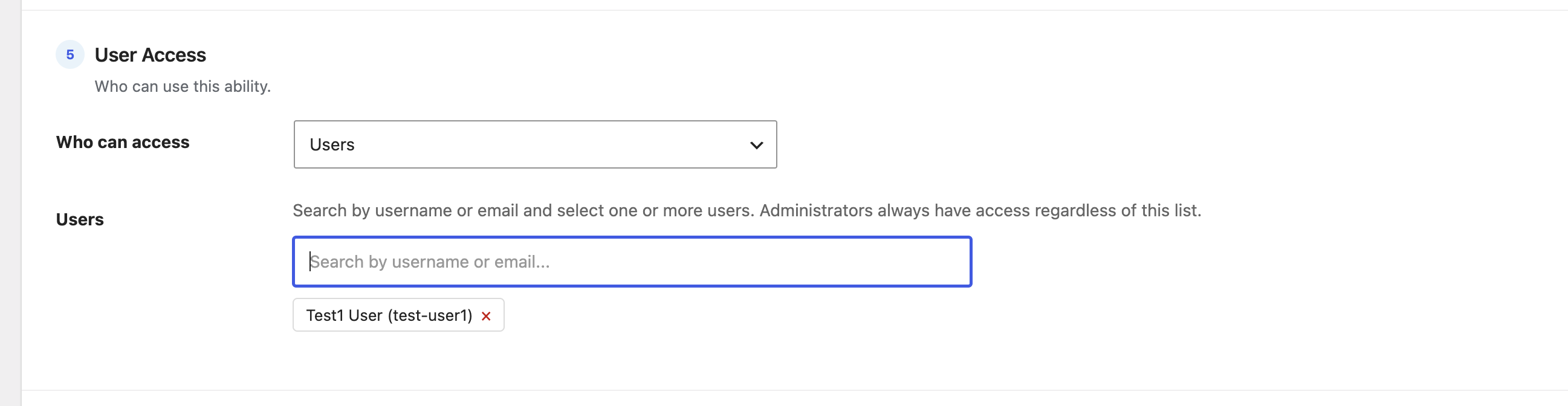
The Users option grants access to named individuals rather than a whole role. It’s ideal when just one or two specific people should be able to use a resource.
How to use it
- Choose Users from the dropdown.
- In the Search by username or email box, type a few characters — matching users appear as you type (it also matches display names).
- Click a person to add them; they show as a removable tag. Repeat for as many users as you like.
- Remove anyone with the × on their tag, then save.
How access is decided
Only the users in the list are allowed. Administrators always have access regardless of whether they’re listed.
Tip: For groups that change often, a WordPress Role or WordPress Capability rule is easier to maintain than a hand-picked user list.